· Updated · 6 min read · StreetLegal Team
Food Truck Website Photography (2026): What to Shoot and Why It Matters
Updated July 31, 2026
A food truck website does not need a glossy commercial shoot before it can launch. It does need real photos that answer a customer's basic questions: what does the food look like, what does the truck look like, who is behind it, and can this operator handle an event professionally?
The minimum viable shot list
If you only have one hour before service, shoot these six assets first: one clean exterior of the truck, three best-selling dishes, one service-window action photo, one owner or team photo, and one catering setup photo. That gives your homepage a real hero image, your menu page real item photos, your about page a human face, and your catering page proof that the truck can show up cleanly for a private event.
The rule is simple: photograph the actual experience. Customers should recognize the truck when they arrive, recognize the item when it is handed to them, and recognize the level of polish they can expect if they book you for an office lunch or wedding after-party.
Menu photos that actually sell the food
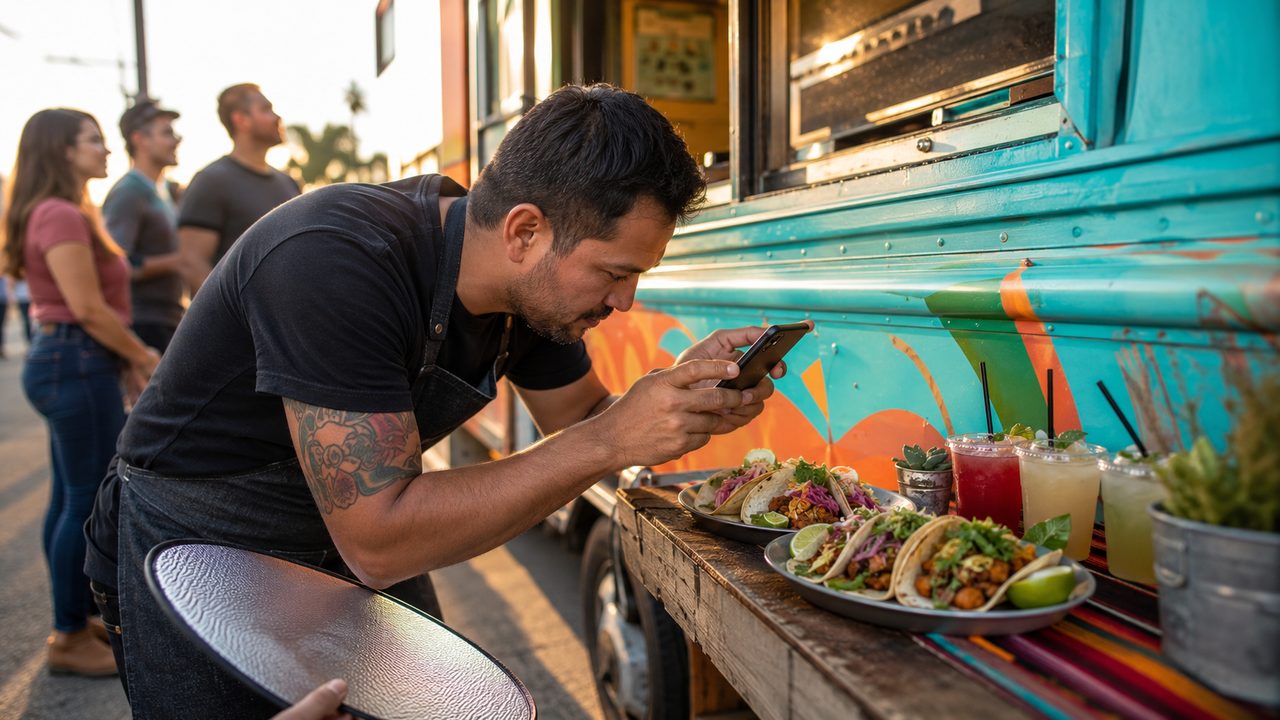
Shoot menu items in soft natural light, close enough that texture is obvious but wide enough that the customer understands portion size. DoorDash's merchant help center has a dedicated workflow for adding menu photos, which is a useful signal: platforms treat item photos as part of the buying experience, not decoration. The same image set can support your website menu, Google Business Profile, direct-ordering page, and delivery-app listings.
- Use real portions. Do not photograph a special oversized version of a taco, bowl, or sandwich that a customer will never receive.
- Keep backgrounds quiet. A clean tray, butcher paper, truck counter, or simple table beats a cluttered prep area.
- Show packaging for delivery-friendly items. If a dish travels well, photograph it in the container a customer will actually receive.
- Reshoot seasonal specials. If an item disappears from the menu, remove the photo from the website rather than letting stale demand build up.
Trust photos: truck, team, and permits
People book food trucks for situations where reliability matters. A clean exterior photo proves they are looking at the right truck. A team photo makes the business feel accountable. A candid service-window photo shows that the operator has handled real lines, real guests, and real rush periods.
Do not upload close-ups of license numbers, health permit IDs, employee badges, or private documents. Show the truck and the service setup, then keep the actual permits organized internally. Your website can say you are licensed and insured without publishing sensitive paperwork.
Catering and private-event photos
Catering buyers need different proof than walk-up customers. They want to see that the truck can park cleanly, stage a line, serve quickly, and look good in front of guests. Shoot one photo of the truck pulled into an event space, one photo of staff serving a group, and one photo of a catering spread or boxed-order setup if that is part of your model. Then use those images near your catering inquiry form, not buried in a generic gallery.
File prep before uploading
Keep originals in a cloud folder, but upload compressed versions to the website. Use descriptive filenames like birria-tacos-food-truck-menu.jpg instead of IMG_4921.jpg, crop hero photos wide, and add plain alt text that describes the image. For most website uses, a progressive JPEG under a few hundred kilobytes loads fast and still looks polished on mobile.
Avoid fake AI menu photos unless they are clearly concept images for an item you have not launched. If the dish on the website does not match the dish in the tray, the photo is hurting trust even if it looks beautiful.
Frequently asked questions
What photos does a food truck website need first?
Start with the truck exterior, three best-selling menu items, a service-window action shot, an owner or team photo, and one catering/event setup photo.
Can phone photos be good enough?
Yes. Natural light, clean backgrounds, real portions, and sharp focus matter more than owning a professional camera.
Should food trucks use stock photos?
No. Use real photos of your actual truck and food so customers know what to expect.
Sources checked July 31, 2026: DoorDash Merchant Support menu photo workflow.
Keep the website assets tied to the rest of the launch paperwork.
StreetLegal helps operators keep permits, insurance, commissary agreements, and launch documents organized so the website reflects a business that is actually ready to serve.
Food truck photo shot list
| Shot | Best use |
|---|---|
| Truck exterior | Homepage hero, Google profile, catering deck, and event applications. |
| Top three menu items | Menu page, ordering page, social previews, and delivery app listings. |
| Service action | Catering page, private event pitches, and trust-building website sections. |
Answers to the most common permit questions — costs, timelines, commissary rules, and more.
Find city-level permit guides for every state we cover — compare costs and requirements.
More from the blog
Jefferson County, MO Food Truck Permit Guide
Complete guide to food truck permits, fees, and requirements in Jefferson County, MO.
City GuidesSt. Charles County, MO Food Truck Permit Guide
Complete guide to food truck permits, fees, and requirements in St. Charles County, MO.
City GuidesSt. Louis County, MO Food Truck Permit Guide
Complete guide to food truck permits, fees, and requirements in St. Louis County, MO.
Buyer's GuideFood Truck POS Systems 2026: Square, Toast, Clover & Avocado
Compare 2026 food truck POS systems by pricing, hardware costs, offline mode, and contract terms for Square, Toast, Clover, and Avocado.