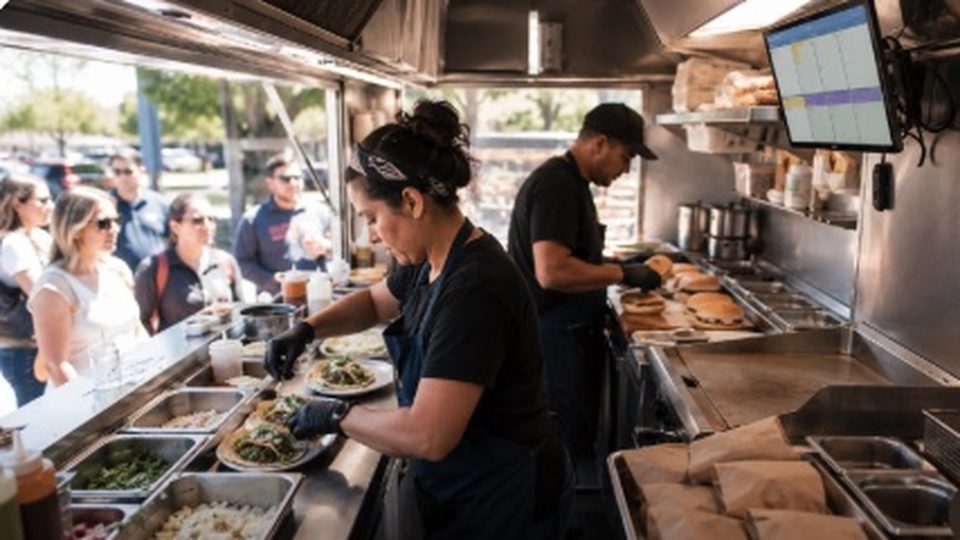
Kitchen Display Systems for Food Trucks: A Beginner's Guide
Updated August 30, 2026
A kitchen display system, or KDS, replaces the paper ticket rail with a screen that organizes orders for the cook line. In a food truck, that can be useful, but it can also be one more device fighting heat, grease, vibration, and bad Wi-Fi. The question is not whether KDS is modern. It is whether it solves a bottleneck your truck actually has.
What a KDS actually does
A KDS takes orders from your POS or ordering channel and displays them for the kitchen. Toast's support documentation describes its KDS as a connection between front-of-house and kitchen staff, with tickets appearing in order and staff selecting whole orders or individual items to fulfill. That basic workflow matters in a truck because the cashier, cook, expo, and pickup window may all be within a few feet of each other, but a lost ticket during a rush still slows everything down.
The useful features are simple: orders sorted by age, item modifiers visible, color or status cues, bumping completed items, and a view of which orders are late. A KDS is not a magic speed upgrade. It only helps if staff trust it, the screen is readable, and every order source flows into the same queue.
When a food truck needs one
A KDS makes the most sense when the truck takes online orders, delivery-app orders, QR orders, or catering-prep tickets in addition to walk-up sales. It also helps when the menu has lots of modifiers, when two cooks work different stations, or when one employee needs to call names and stage pickup bags while another finishes food.
A small truck with a short menu may be better off with one printer and a tight call-back system. If every ticket is one burger, one taco plate, or one coffee order, the screen may add subscription cost without removing much friction. Test the problem first: are tickets getting lost, misread, fired in the wrong order, or mixed between walk-up and online orders? If yes, KDS deserves a look.
Real KDS pricing examples
Public pricing is usually per screen or bundled into a restaurant POS plan. Square lists Square KDS at $30 per month per device with Square Plus or $20 per month per device with Square Premium. Fresh KDS lists Essentials at $20 per screen per month and Premium at $27 per screen per month when billed monthly, with lower yearly billing prices. Toast markets its KDS hardware around durable restaurant use and says the hardware is tested for high temperatures up to 120 degrees Fahrenheit, spills, grease, and nonstop service; confirm current Toast package pricing in a quote before budgeting.
| Option | Public pricing signal | Truck fit |
|---|---|---|
| Square KDS | $30/month per device with Square Plus or $20/month per device with Square Premium | Best if the truck already runs Square for Restaurants and wants one integrated order queue. |
| Fresh KDS | $20/month per screen for Essentials or $27/month per screen for Premium when billed monthly | Worth checking if you want a per-screen KDS app that can fit iOS or Android workflows. |
| Toast KDS | Quote-based package; public hardware page emphasizes rugged restaurant conditions | Best for trucks already committed to Toast and a restaurant-style hardware stack. |
| Printer-first workflow | No KDS software subscription, but printer paper and hardware still cost money | Good for low-volume trucks or short menus where the ticket rail already works. |
Do not budget only the monthly software. Include the tablet or display, mount, protective case, power, network gear, backup printer, and replacement plan. Trucks are tougher on electronics than dining rooms because screens sit near heat, sun glare, vibration, and splashes.
Truck-ready setup checklist
- Mount the screen where cooks can read it without blocking the line. Avoid a spot directly above the flat-top, fryer, steam, or dish area.
- Protect power and connectivity. Use a reliable power source, secure cables, and know what happens when hotspot service drops.
- Keep a printer backup. Festivals, parking lots, and cell dead zones are exactly where paper can rescue service.
- Limit the number of queues. Walk-up, online, delivery, and catering orders should be easy to distinguish without forcing staff to watch four apps.
- Train the bump routine. Decide who marks items complete, who stages bags, and who calls names before the first busy shift.
Alternatives to a full KDS
Before buying software, fix the workflow. A clear printed ticket, a dedicated expo person during rushes, menu simplification, prep batching, and one pickup staging shelf may solve the problem. For some trucks, the best "KDS" is a printer at the cook station plus a laminated rush checklist.
Move to a KDS when you need visibility across channels. If a customer can order from your website, a QR code, a delivery app, and the front window, the screen helps staff see the whole service instead of reacting to whichever device beeps loudest.
Frequently asked questions
Can I use an iPad as a KDS?
Often yes, depending on the POS and KDS app. Confirm device support, mounting, charging, and whether the app works reliably with your truck's internet setup.
Is KDS better than a kitchen printer?
It depends on order complexity. KDS is better for mixed channels and status tracking; a printer can be simpler and more resilient for short menus.
Do I need more than one screen?
Most single-truck operators should start with one screen. Add a second only if separate stations truly need separate views.
What should I test during a trial?
Run a real lunch rush with modifiers, online orders, refunds, ticket edits, and weak connectivity before committing to a monthly plan.
A KDS is only useful if the rest of the operation is organized.
StreetLegal helps food truck teams keep permits, inspections, commissary agreements, and operating details in one place, so service tech supports a cleaner workflow instead of adding another loose system.
Answers to the most common permit questions — costs, timelines, commissary rules, and more.
Find city-level permit guides for every state we cover — compare costs and requirements.
More from the blog
Jefferson County, MO Food Truck Permit Guide
Complete guide to food truck permits, fees, and requirements in Jefferson County, MO.
City GuidesSt. Charles County, MO Food Truck Permit Guide
Complete guide to food truck permits, fees, and requirements in St. Charles County, MO.
City GuidesSt. Louis County, MO Food Truck Permit Guide
Complete guide to food truck permits, fees, and requirements in St. Louis County, MO.
Buyer's GuideFood Truck POS Systems 2026: Square, Toast, Clover & Avocado
Compare 2026 food truck POS systems by pricing, hardware costs, offline mode, and contract terms for Square, Toast, Clover, and Avocado.